
Kassensysteme mit persönlicher Betreuung in Südbaden, am Bodensee, in der Nordwestschweiz und in Zürich
Kassensysteme mit persönlicher Betreuung in Südbaden, am Bodensee, in der Nordwestschweiz und in Zürich
Around the POS · Pagers
The guest orders, takes a pager and sits down. When the food is ready, the pager vibrates and lights up – no calling out names, no crowd at the counter. We set it up with HIOPOS and leafsystems to suit your POS system.
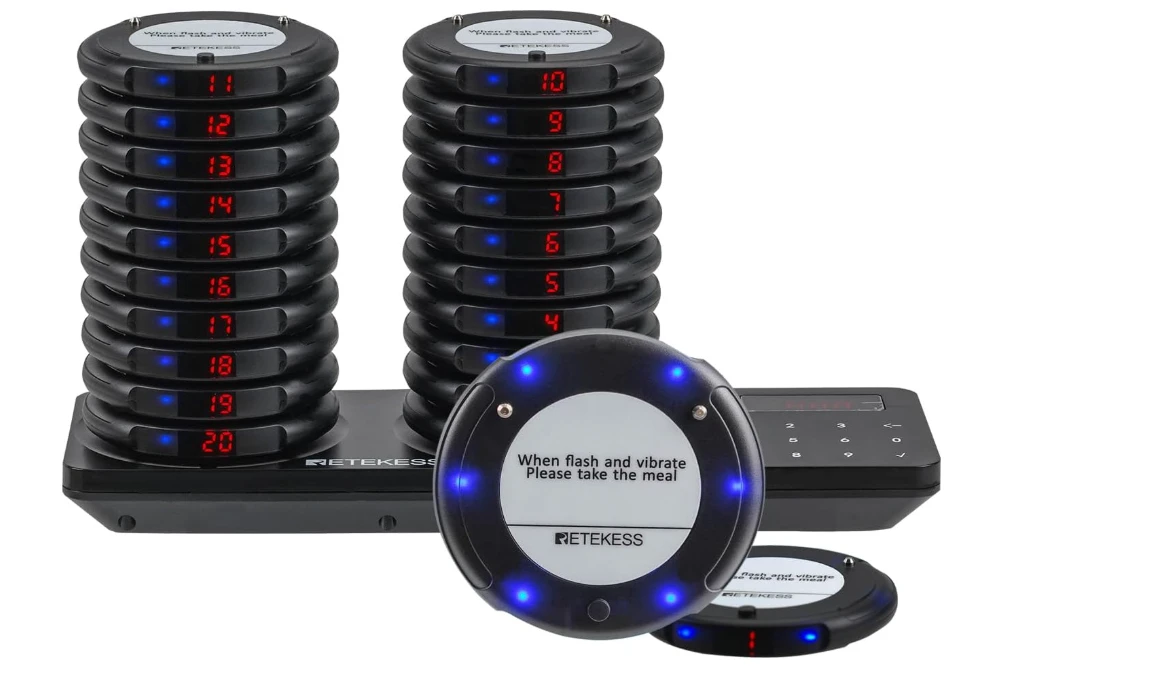
In short: With a guest pager, your guests don’t have to wait at the counter: the pager flashes and vibrates as soon as the food is ready. We use pagers with HIOPOS and leafsystems. The cost depends mainly on how many pagers you need – a set consists of a charging station and pagers.
No queuingGuests wait at their table
Flashes & vibratesAs soon as the food is ready
With self-order kioskOrder, pay, take a pager
HIOPOS & leafsystemsIntegrated into your POS
01
Why a pager?
No more crowding at the counter.
Waiting without queuing
In self-service, the bottleneck is rarely at the till but before and after it: guests stand at the counter, ask whether their food is ready yet, and your team calls numbers or names across the room. Especially when it’s loud or guests are sitting outside, a lot gets lost.
With a pager, the guest takes their order to their seat, so to speak. As soon as the kitchen is done, the pager goes off. The guest collects their food, returns the pager, and the pager goes back into the charging station.
Your benefits at a glance
02
From ordering to returning the pager in four steps – your team no longer has to call anyone.
The guest orders at the till or the self-order kiosk and receives a pager. At the kiosk the guest enters their pager number themselves, at the till your team records it – so the kitchen and counter know which order belongs to whom.
The guest sits down in the dining room, on the terrace or in the beer garden. The order goes to the kitchen printer or kitchen display as usual.
When the food is ready, your team calls the pager number, for example using the keypad on the charging station. The pager flashes and vibrates until the guest is at the counter.
The guest collects their food at the counter and returns the pager. In the charging station it is ready again for the next guest.
03
Pagers in action
An example from Freiburg.
At the Yepa Yepa taqueria, guests order at the self-order terminal, enter their pager number there and wait at their seat until the pager goes off. In the video, owner Robin explains how it works. To the case study →
04
We use pagers with these POS systems. We work out together which pagers and how many you need.
With HIOPOS you work at the till, the self-order kiosk and with the HIOSCREEN kitchen display. We integrate the pager into this process so that ordering, kitchen and counter fit together.

With leafsystems orders run via the till, self-order terminal or QR code and land on the kitchen display. The pager makes sure the guest knows when to collect – in the canteen or at the outdoor pool too.

05
Typical businesses
Pager or pick-up display?
We use radio pagers with a charging station: each pager shows its number clearly, flashes and vibrates when called and charges stacked on the base station. You call any number with a few taps on the station’s keypad.
We work out with you how many pagers you need, where the charging station goes and how calling fits into your process – whether at the till, at the Self-order kiosk or in the kitchen. Then we set everything up and test the process with your team.
You have a contact person if a pager goes missing, needs to be reordered or your process changes.
06
A small radio device the guest takes after ordering. When their food is ready, the pager vibrates, lights up or beeps. The guest then returns it at the counter.
We use pagers with HIOPOS and leafsystems. We discuss how the pager fits into your process to suit your system.
That depends on the POS system and the pager. We set up calling so that your team can trigger it directly as soon as the order is ready.
Yes. The guest orders and pays at the kiosk and takes a pager. Instead of a pager, a pick-up number shown on the pick-up display also works.
As many as there are orders being prepared at the same time in your busiest hour, plus a small reserve. We work it out with you based on your figures.
That rarely happens, because most guests return the pager when collecting. A sign at the counter helps. You can reorder individual pagers.
Not necessarily. Many businesses use either pagers or a pick-up display. If guests also sit outside, combining both is practical.
The pager is one building block – together with the till, kitchen display and the right add-ons, you get a process that suits your business.
More solutions: POS solutions · Self-order kiosk · Card payment · Online ordering · Customer loyalty · Online vouchers · Rental POS · QR code
Book your free consultation – we’ll show you how ordering, kitchen and pagers work together with your POS system, on site or online.