
Kassensysteme mit persönlicher Betreuung in Südbaden, am Bodensee, in der Nordwestschweiz und in Zürich
Kassensysteme mit persönlicher Betreuung in Südbaden, am Bodensee, in der Nordwestschweiz und in Zürich
Around the POS · QR code
Guests scan the QR code on the table, order with their own smartphone and pay right away if they like – no app needed. The order goes straight to the till and kitchen.
Your team saves walking and has more time for guests. We set this up for leafsystems, HIOPOS and Lightspeed and adapt the process to your business.
In short: With the QR code on the table, guests order with their own phone and pay right away if they like – no app, and the order goes straight to the till and kitchen. Possible with leafsystems, HIOPOS and Lightspeed. The cost depends on the POS system and on whether paying by phone is added.
Order at the tableWith their own smartphone
Pay at the same timeDirectly on the phone if desired
No app neededScanning the QR code is enough
3 POS systemsleafsystems, HIOPOS, Lightspeed
01
Why QR code at the table?
Fewer trips, more time for your guests.
Order whenever the guest wants
When it’s busy, guests often wait longer for the service than for the food: first for the menu, then to order, and finally for the bill. The second drink or the dessert simply doesn’t happen.
With the QR code on the table, guests open the digital menu on their own phone – without an app. They order when they’re ready and, depending on the process, can pay straight away. Your team brings the food, clears the tables and has time for guests instead of carrying orders back and forth.
Your benefits at a glance
02
From scanning to paying in four steps – the guest doesn’t need an app.
There is a QR code on every table, for example as a table stand or sticker. The guest scans it with their phone camera and the menu opens in the browser – the table number is already stored.
The guest browses the menu with photos and descriptions, chooses extras and sends the order. Reordering works any time via the same code.
The order appears immediately in the till and on the kitchen display or receipt printer – with the table number. Nobody has to retype anything.
Depending on the system and process, the guest pays on their phone when ordering or at the end as usual with the service staff. With Lightspeed this also works via a QR code on the bill.
03
What it looks like
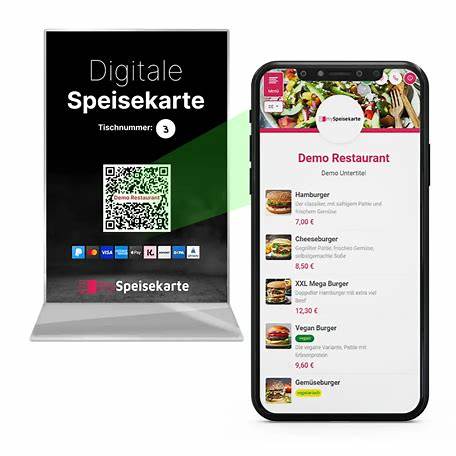
Table stand with table number and QR code.
A table stand with table number and QR code – after scanning, the menu with photos and prices opens directly on the phone.
04
We implement ordering and paying by QR code with these three POS systems. We clarify which option suits your business during the consultation.
With leafsystems guests open the digital menu via the QR code and order without waiting for service. Orders go straight to the till and kitchen – for example on the lakeside terrace of the Café am See in Titisee.

With HIOPOS guests scan the QR code on the table, see the menu on their own smartphone, order and pay directly if they wish. The orders appear on the HIOSCREEN kitchen display.

With Lightspeed guests order by QR code at the table and pay right away if they like. There is also Scan to Pay: the printed bill has a QR code the guest uses to pay on their phone – split and with tip too.

05
Typical businesses
In practice
We create the digital menu with you, generate the QR codes for your tables and connect everything to the till, kitchen and card payment. If you like, we combine the QR code with the Self-order kiosk or with pagers for pick-up.
Then we test the process with your team – and you have a fixed contact person if your menu or prices change.
06
No. The QR code opens the menu directly in the smartphone’s browser. The normal phone camera is all they need.
We implement ordering and paying by QR code with leafsystems, HIOPOS and Lightspeed. We clarify which option suits your business during the consultation.
Not necessarily. Depending on the system and process, guests pay straight away on their phone or at the end with the service staff as usual. We decide this with you.
A Lightspeed feature: the printed bill has a QR code. The guest scans it, sees their bill on the phone and pays – split and with tip too.
No. It saves your team walking, for example for repeat orders. Guests can still order from the service staff as usual.
The menu comes from your till. If you change prices or remove a dish, guests see it immediately the next time they scan.
That depends on the POS system and the scope, for example whether paying by phone is added. We calculate it for your business.
The QR code is one building block – together with the till, kitchen display and card payment, you get a process that suits your business.
More solutions: POS solutions · Card payment · Self-order kiosk · Pager · Online ordering · Customer loyalty · Online vouchers · Rental POS
Book your free consultation – we’ll show you how ordering and paying by QR code works with your POS system, on site or online.